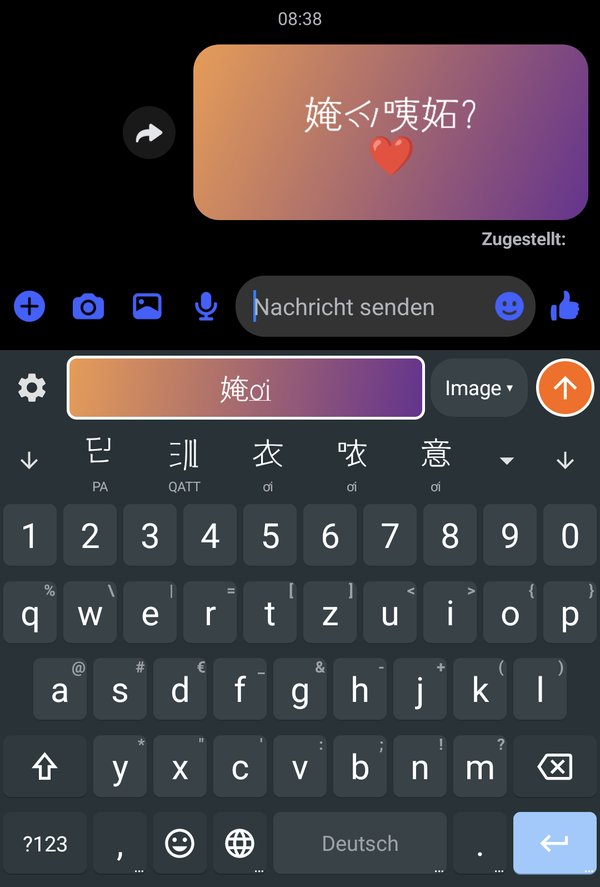
Type as usual, send in the script you like.
Open the field
In any app, tap the 喃 icon in the suggestion bar. A field of its own opens above the keyboard.
Type Telex, pick a character
Type Vietnamese with Telex. Below the field come the candidates in PA, QATT and Chữ Nôm; a tap picks one, the space bar converts the word by itself.
Send it as an image
The orange send button puts the text in as an image in the style you chose. The receiver sees exactly what you see, without any font.
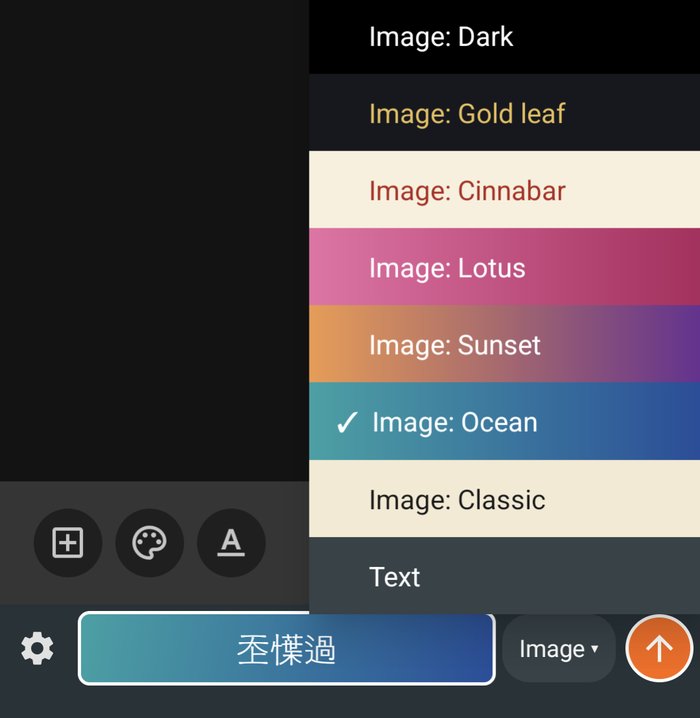
Choose the look of your image.
Pick a style in the menu next to the send button; the field shows the image that will be sent at once, with the same line breaks.
Every app keeps its own choice.
Or as text
Send Chữ Nôm as Unicode text when you like; in an app that takes no images the keyboard sends text by itself.
Your scripts
Switch PA, QATT and Chữ Nôm on or off, and choose what the space bar converts to.
An everyday keyboard
Outside the field it is a full keyboard: Vietnamese, German, English and many more languages, with word suggestions.
Installed in three steps.
- Download the APK and open it; Android asks whether this browser may install apps — allow it.
- Open QATTKey, switch the keyboard on (Settings → System → Keyboard) and choose it as the active keyboard.
- The first time you open the field you choose the scripts you want.
This is a beta that is published only as an APK (not on Google Play), for Android 5 and newer.
QATTKey is a fork of HeliBoard (GPL-3.0). Source code: qtng/qatt-chunom-apk.